MachShip Winter Release 2026
.jpg)
MachShip now has a rebuilt interface designed to feel faster, cleaner and easier to move through. Alongside the new look, this release gives teams more control over shipping rules and booking safeguards, faster bulk reconciliation, and a new barcode-driven packing workflow.
We're also introducing three add-on features for teams that want to extend their MachShip setup: Advanced Branded Tracking, Journeys, and Case Management Lite.
Here's what's new and why it matters
New Features
A New MachShip experience
MachShip's new React-based interface gives you a more consistent experience across the platform, with updated layouts and navigation across core screens.
- Cleaner navigation and layout consistency across core screens
- React-based interface replacing the legacy front end
Self-serve Rules Engine
Automate carrier selection, delivery behaviour and pricing logic; rules are now yours to configure directly with a no-code AI-assisted rules builder. You can create, update and troubleshoot your own rules without raising a support ticket, making it easier to keep rules aligned with changing conditions.
.png)
Shipping Rules
Shipping Rules let you configure which carriers and services are offered on a consignment directly in the admin interface. Carrier-selection controls that previously required support, including legacy route restrictions, are now available through a self-serve setup.
- A structured IF/THEN builder
- Include or exclude carriers and services by condition (lane, item attributes and more)
- Create, edit, test and activate rules yourself, without raising a ticket
Shipping Modifiers
Keep cut-offs, transit times and dimensional rules in one place, making changes easier to manage and harder to miss.
Shipping Modifiers give you control over operational tweaks like cut-offs, transit times and dimensional handling. This gives you one consistent, rule-based approach to handle them, so you can adapt faster with less risk of unexpected downstream impacts.
- A structured IF/THEN pattern for operational tweaks
- Support for common modifier types (cutoffs, transit times, item dimensions)
- An admin experience aligned to shipping rules and surcharges
Surcharge Rules
Keep all your surcharge logic in one place you can actually audit, so rules stop overlapping and pricing holds fewer surprises. Centralising the logic makes it easier to find, review and maintain your surcharge configuration, helping reduce pricing surprises and admin overhead.
- A single place to manage Surcharge Rule configuration
- A rule pattern consistent with shipping rules and modifiers
- Better maintainability for pricing operations
Bulk Accept Carrier Invoice Dimensions & Weights
Reconciling carrier invoices just got faster.
If a carrier invoices different dimensions or weights than you booked, you no longer have to fix each consignment by hand.
- Bulk accept in one action: select any number of consignments on the reconciliation grid and choose Accept Carrier Dimensions and Weights.
- Repriced in the background: we rebuild each consignment's items from the carrier's invoiced volume and weight. No modals, no per-line editing.
- Also supports DG: Update Items on the balance page supports DG consignments, so you can adjust dimensions without losing DG data.
High-Value Consignment Flagging
Set a company-level dollar threshold to flag unusually expensive consignments before they're booked.
When a consignment meets or exceeds the threshold, MachShip flags it and prompts the user to confirm the declared amount before proceeding. Optional notifications can also be configured. This adds a deliberate check at the point of booking, helping catch accidental high-value consignments before they're processed and giving admins greater control over freight spend.
- A company-level dollar threshold
- An "are you sure?" confirmation before booking
- Optional notifications to nominated contacts
Scan-to-Pack
Scan to Pack is a new barcode-driven packing workflow that lets users open a pending consignment by scanning a pickslip, add packages, service options, carrier choices, and DG declarations by scanning barcodes with minimal screen interaction. It reduces manual clicking during packing, increases packing throughput, and minimises typing errors.
- A scanning workflow designed for the pre-manifest state.
- Scan, pack and create consignments in one workflow.
Feature Add-ons
Add-ons help you customise and enhance your MachShip plan with additional features so you can deliver more value to your customers.
Advanced Branded Tracking
Replace the generic carrier tracking experience with one that carries your brand through to delivery.
Configure an Advanced Branded Tracking page with your logo, colours and content, then turn every tracking interaction into an opportunity to engage customers. Add marketing assets, imagery, videos, product links and customer ratings to create a branded experience that keeps your business front and centre from dispatch through to delivery.
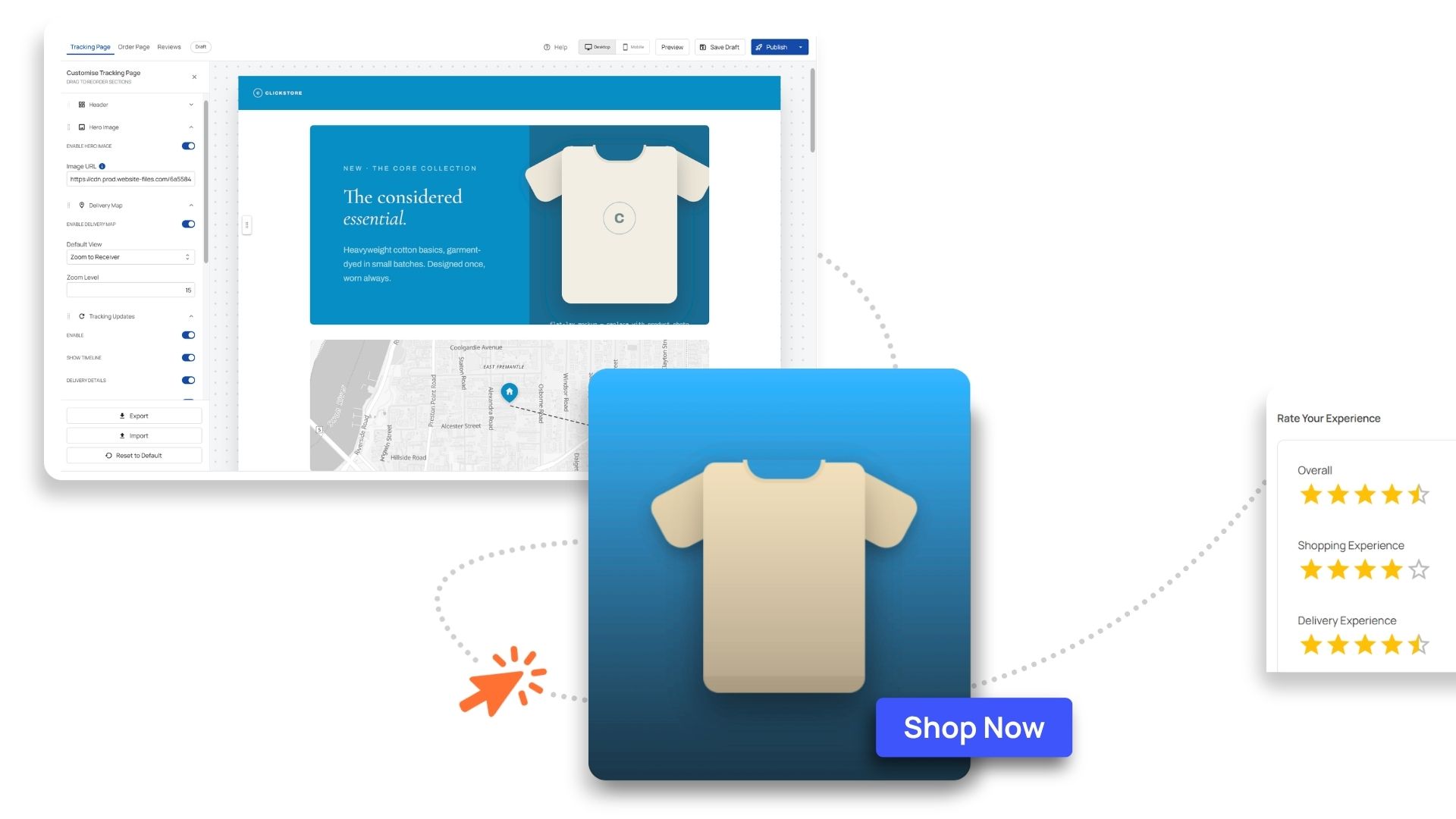
- A branded tracking page, configure with your logo, colours and content
- Product links and opportunity to include campaign assets
- A richer recipient-facing tracking experience, with a visual delivery map and configurable tracking details as well as SMS/email update subscriptions
Journeys and Depots
One journey, multiple carriers. Freight routed via a depot, with each leg created as its own consignment. Journeys makes booking multiple consignments a streamlined process and provides a single view for tracking and invoicing.
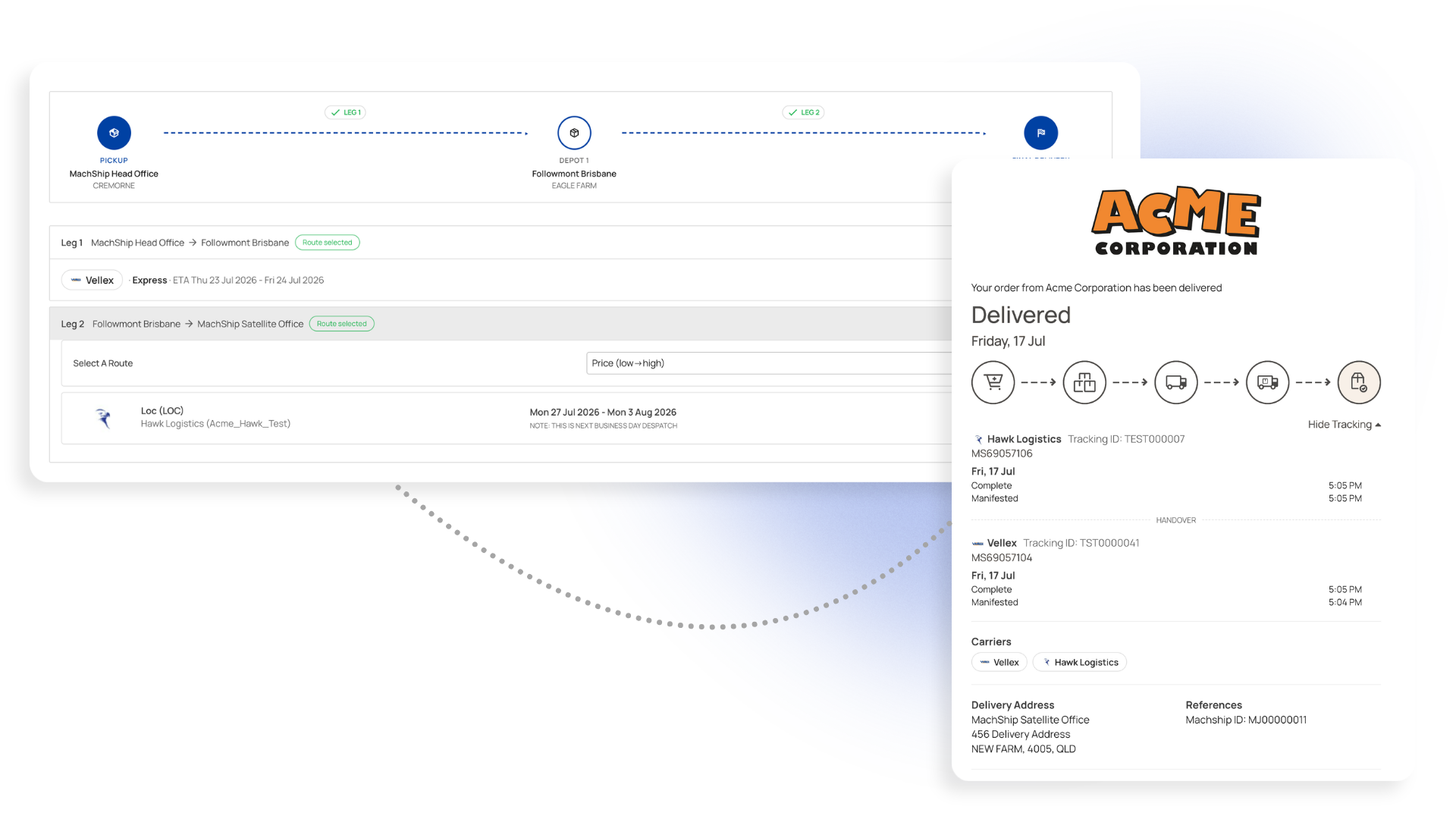
- Manage depots for customer collection and Journeys.
- Route freight via a depot, with each leg created as its own consignment.
- Add legs with a click, including carrier, route and cost before creating the journey.
- Manifest all legs at once, or hold later legs until earlier ones deliver.
- View one journey-level status and ETA, with legs wrapped into a single invoice line item.
Case Management Lite
Message directly on a consignment and communicate in context, rather than across emails and phone calls.
Keeping conversations on the consignment gives the right people one place to see updates, respond and manage exceptions, making it easier to keep track of what's happening and who needs to act.
- A message thread that lives on the consignment
- Watchers system so notifications reach the right people
- File attachments as part of the conversation
- A single activity timeline
Interested in understanding more about our new features and the value MachShip can bring to you and your customers? Book a demo today.
Insights & Articles
.jpg)

%20(1).png)